Restricted zone intrusion
Alert the moment someone enters an area they should not, such as server rooms or warehouses.
IndustryLogisticsGovernment
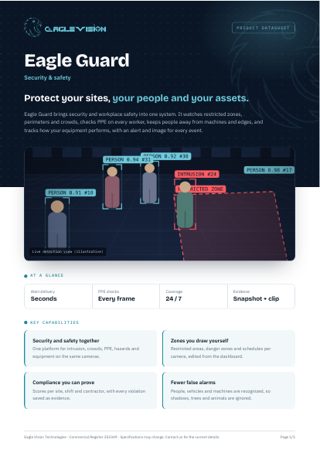
Eagle Guard brings security and workplace safety into one system. It watches restricted zones, perimeters and crowds, checks PPE on every worker, keeps people away from machines and edges, and tracks how your equipment performs, with an alert and image for every event.
Everything in one PDF to share with your team: key capabilities, all 45 use cases, the technical overview and how to reach us. Downloads in the language you are reading.
Alert the moment someone enters an area they should not, such as server rooms or warehouses.
Detect anyone on the premises outside working hours, with a schedule per zone.
Watch fences and walls for climbing or crossing along the whole perimeter.
Detect bags or objects left unattended longer than allowed.
Spot more than one person passing through on a single access.
Alert when gates, shutters or doors stay open longer than allowed.
Alert when a vehicle stops in a no-parking or restricted zone.
Flag people who stay too long near ATMs, entrances or parked vehicles.
Alert when people gather beyond a set number in public or sensitive areas.
Measure density at halls, gates and squares to prevent dangerous overcrowding.
Alert on people or vehicles moving against the allowed direction in exits and lanes.
Detect sudden running or aggressive movement in schools, malls and public areas.
Detect damage to glass, walls, gates and public property.
Flag any worker without a helmet in required zones.
Make sure every worker on site wears a high-visibility vest.
Gloves, goggles and safety boots, configured per area.
Early visual warning of smoke or flame in areas without sensors.
Alert when exits and evacuation routes are blocked by goods, carts or vehicles.
Watch over staff working alone at night or in remote areas, and alert when there is no movement.
Detect people climbing scaffolding, racks, fences or rooftops.
Visual early warning of water in server rooms, basements and stores.
Alert when people enter the working radius of machines.
Detect people too close to moving forklifts and loaders.
Alert when people approach unprotected edges and openings.
Detect a person who has fallen and is not moving, and alert the nearest team.
Detect smoking near fuel, chemicals or storage.
Keep pedestrians out of lanes reserved for trucks.
Keep people out from under crane loads and lifting areas.
Detect liquid spills or oil leaks on the floor around machines.
Alert when people enter machines or areas under maintenance.
Estimate vehicle speed on sites and yards and flag speeding.
Detect equipment operating outside the hours you allow.
Measure working versus idle time for excavators, loaders and cranes.
Alert when machines sit idle beyond a set time during a shift.
Count loading cycles and measure the time spent per truck.
Read stack and indicator lights to log running, stopped and fault states.
Read pressure and temperature dials from camera images.
Detect when a line or conveyor stops and log the downtime.
Count who is on site at any moment, by entrance and shift.
Daily and weekly safety reports per site and contractor.
A visual daily record of progress in each project area.
Make sure each contractor crew works only in its assigned area.
Know when a camera is covered, moved, blurred or loses its signal.
Alert when tools, generators or high-value assets leave their designated area.
Confirm that guards reach each checkpoint on schedule, with the image as proof.
No use cases match this combination yet. Tell us your requirement and we can build it.
Talk to us →Every Eagle Guard deployment runs on the same Eagle Vision platform: the same dashboard, the same alerts, the same reports, in Arabic and English.
Add your NVR or DVR, or paste an RTSP link. Eagle scans the recorder and pulls in every camera automatically.
Draw the areas that matter on the camera image: a restricted door, a cashier queue, a kitchen counter, a site entrance.
Choose who gets notified, when, and how. Each alert arrives with the snapshot and moment that triggered it.
Daily reports per branch, per camera and per use case. See trends, compare sites and act on what the numbers show.
Tell us about your site and the problem you want solved. We will come back with a demo plan built around it.